
Overview
This article explains how to use On-Demand Audiences with supported CRM platforms, allowing you to activate audiences powered by Future Anthem into campaigns that are already configured in your CRM. The integration enables audiences to be generated on demand and linked directly to existing CRM campaigns.
How It Works
-
Campaigns are created and configured in your CRM platform
-
Real-time and personalised audiences are generated in Future Anthem based on selected attributes, trigger points and time windows
-
At the moment of generation, the audience is pushed to the CRM and linked to the pre-existing campaign
-
The CRM platform handles delivery and execution using its native campaign logic
Pre-requisites
Before getting started, ensure that:
- The integration between your CRM and Future Anthem is established
-
The CRM campaign is already created and active in the CRM platform
-
You have access and permissions to create and generate On-Demand Audiences within the Future Anthem platform
-
The required identifiers (e.g. customer ID) are aligned between Future Anthem and the CRM
Xtremepush Integration
The Xtremepush integration allows On-Demand Audiences to be linked to existing Xtremepush campaigns, enabling immediate activation without additional campaign setup.
Step-by-step guide:
-
Create your campaign in Xtremepush and note the campaign ID
-
In the Future Anthem platform, create or open an On-Demand Audience and configure the audience attributes, trigger points and time windows
-
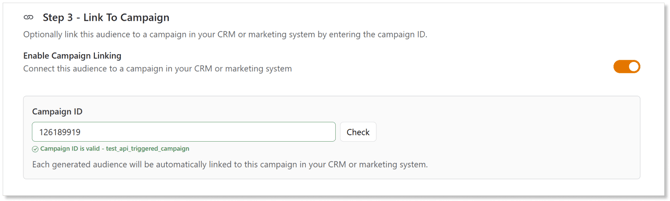
At step 3 (one-time audiences) or step 4 (real-time triggered audiences) enter the campaign ID noted from #1 and hit "Check". This will use the validate request to check the campaign exists in Xtremepush. If successful you will see the campaign name in the response
-
Generate your audience in real-time or schedule it for future datetime(s)
- Once the audience is generated, the execute request will be made to push the the audience into the specified campaign
- Verify audience receipt and execution in Xtremepush