
To evaluate the effectiveness of game recommendations, we use a controlled testing approach involving two distinct cabinet groups:
- Target Group: Cabinets that receive recommendations generated by Future Anthem.
- Control Group: Cabinets that receive alternative recommendations. These include Popular, Random, or even no recommendations, depending on the operator’s decision.
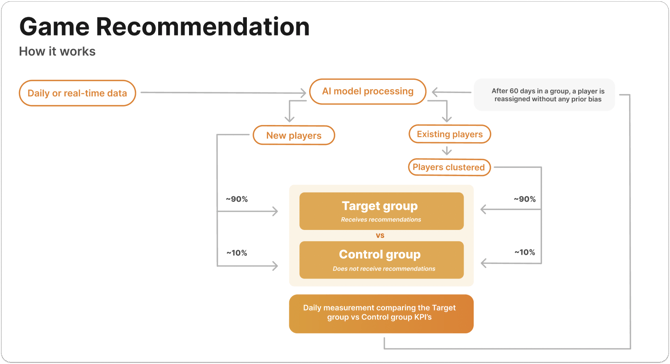
Why Target vs Control?
Future Anthem primarily uses a target vs control testing framework to measure the effectiveness of its game recommendations. This involves comparing the behaviour of cabinets receiving Future Anthem’s recommendations (Target group) with those receiving alternative or no recommendations (Control group).
This method helps to provide an accurate and unbiased assessment of impact, avoiding distortions caused by external factors such as seasonal fluctuations and organic growth.
During new launches, we also carry out pre vs post analysis to assess performance. This typically involves comparing KPI's from the 60-90 days prior to go-live with the 60-90 days after. This method also offers useful insights and is best used as a complementary view alongside target/control comparisons.
Stratified Group Allocation
To ensure fairness and eliminate bias, cabinets are first segmented into 10 value groups based on their recent real cash stakes. These bands represent different cabinet value tiers.
Once segmented, cabinets are then evenly distributed between the target and control groups within each band at the agreed ratio split, i.e. 90% in Target and 10% in Control.
This stratification ensures both groups are behaviourally balanced for a fair comparison.
Reporting Dashboards
Understanding the "Group Comparison" page
Overview
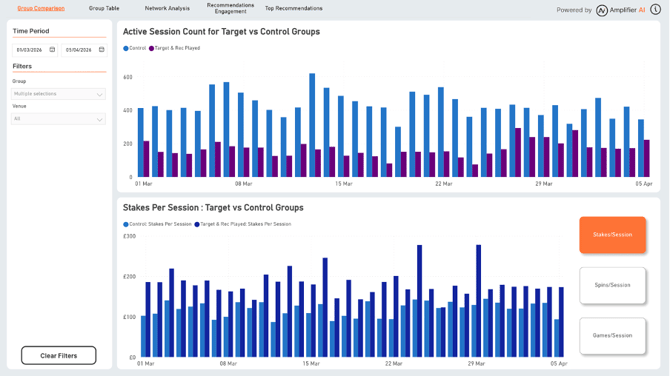
This dashboard provides a comparative analysis between target and control groups for retail game recommendations, allowing operators to evaluate the effectiveness of the Future Anthem recommendation engine across cabinet sessions.
It compares active session volumes and session-level KPIs across cabinets that received Future Anthem recommendations and cabinets in the control group.
Filter Options
- Time Period: Set a custom date range to view the data over a specific period.
- Group: Select one or more groups for comparison. Available groups include All, Control, Target & Rec Played, and Target & Rec Not Played.
- Venue: Filter the dashboard by venue to analyse recommendation performance across specific retail locations.
Key Sections of the Dashboard
- Active Session Count for Target vs Control Groups:
This chart compares the daily active session count across the selected groups.- All: Represents all active sessions across both target and control groups.
- Control Group: Represents active sessions from cabinets that did not receive Future Anthem's game recommendations.
- Target & Rec Played: Represents active sessions from targeted cabinets where the recommended games were engaged with.
- Target & Rec Not Played: Represents active sessions from targeted cabinets where recommendations were shown but the recommended games were not engaged with.
- <KPI> Per Session: Target vs Control Groups: This chart displays the average KPI value per session within each group, broken down daily.
- Available Metrics
- Stakes/Session: Displays the average stakes per session for each group.
- Spins/Session: Shows the average number of spins per session for each group.
- Games/Session: Shows the average number of different games played per session for each group.
- Available Metrics
Interpreting the Data
- Higher Engagement in Target Groups: A consistently higher active session count or stronger KPI performance in the target groups compared to the control group may indicate that game recommendations are positively influencing retail engagement.
- Impact of Recommendations on Game Variety: If Target & Rec Played sessions show a higher average number of games per session, this suggests that recommendations may be encouraging customers to explore a broader range of games on the cabinet.
- Recommendation Engagement: Comparing Target & Rec Played against Target & Rec Not Played helps operators understand the difference between sessions where recommendations were acted upon and sessions where recommendations were shown but not engaged with.
- Venue-Level Performance: Using the Venue filter can help identify locations where recommendations are performing strongly, as well as venues where recommendation engagement may require further investigation.
Best Practices for Using This Dashboard
- Monitor session engagement trends over time to evaluate the ongoing effectiveness of personalised retail recommendations.
- Compare Control, Target & Rec Played, and Target & Rec Not Played groups to understand whether recommendations are influencing session behaviour.
- Use the Venue filter to identify differences in recommendation performance across retail locations.
Understanding the "Group Table" page
Overview
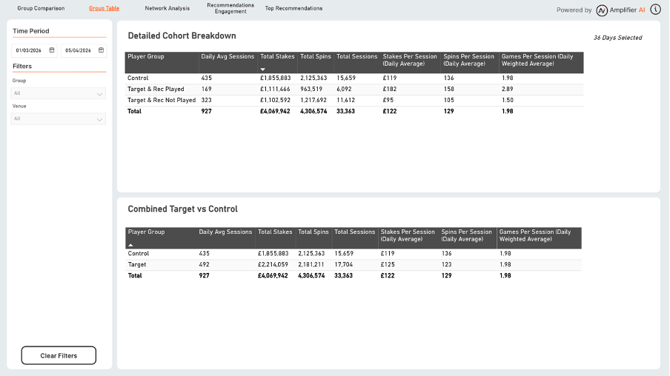
This report provides a detailed breakdown of retail recommendation performance by group, showing differences in session activity and engagement with recommended and non-recommended games.
The report highlights daily average sessions, total stakes, total spins, total sessions, and session-level engagement metrics across each group. This helps operators assess how game recommendations are influencing cabinet sessions and overall retail behaviour.
The page includes two tables:
- Detailed Cohort Breakdown: Separates sessions into Control, Target & Rec Played, and Target & Rec Not Played.
- Combined Target vs Control: Combines the target cohorts into a single Target group, allowing operators to compare total Target performance directly against Control.
Group and Session Type Breakdown
The report categorises sessions into distinct groups based on whether recommendations were served and whether recommended games were played.
- Control: Represents active sessions from cabinets in the Control group that did not receive Future Anthem recommendations. This group serves as the baseline for comparison against sessions where recommendations were served.
- Target: In the Combined Target vs Control table, this combines all targeted sessions, including both Target & Rec Played and Target & Rec Not Played, to provide a direct comparison against the Control group.
- Target & Rec Not Played: Represents active sessions from targeted cabinets where game recommendations were shown, but the recommended games were not played.
- Target & Rec Played: Represents active sessions from targeted cabinets where recommendations were shown and at least one recommended game was played.
Key Metrics in the Report
The following metrics provide insights into retail session behaviour across each group:
- Daily Avg Sessions: The average number of active sessions per day within each group.
- Total Stakes: The total amount staked across sessions in each group, providing insight into overall monetary engagement.
- Total Spins: The total number of spins recorded for each group, showing overall play volume.
- Total Sessions: The cumulative number of sessions recorded for each group.
- Stakes Per Session (Daily Average): The average stakes per session per day, helping operators compare spend intensity across groups.
- Spins Per Session (Daily Average): The average number of spins per session per day, showing how frequently customers engage with games during sessions.
- Games Per Session (Daily Weighted Average): The average number of different games played per session, weighted daily, highlighting game variety within each group.
Interpreting the Data
- Control Group as Baseline: The Control group serves as a reference point, providing insight into typical engagement levels when no recommended games are played.
- Higher Engagement in Target & Rec Played:Players who engaged with recommendations show significantly higher values in metrics such as Spins Per Player and Sessions Per Player. This suggests that recommendations enhance player engagement when they are acted upon.
Best Practices for Using This Report
- Control Group as Baseline: The Control group provides a reference point for typical cabinet session behaviour when Future Anthem recommendations are not served.
- Target vs Control Performance: The Combined Target vs Control table helps operators understand whether targeted sessions are generating stronger overall engagement than control sessions across stakes, spins, sessions, and game variety.
- Recommendation Engagement: Comparing Target & Rec Played with Target & Rec Not Played shows the difference between sessions where recommendations were acted upon and sessions where recommendations were shown but not played.
- Higher Engagement in Target & Rec Played: If Target & Rec Played sessions show higher stakes per session, spins per session, or games per session, this suggests that recommendations may be enhancing session engagement when customers interact with them.
Understanding the "Network Analysis" page
Overview
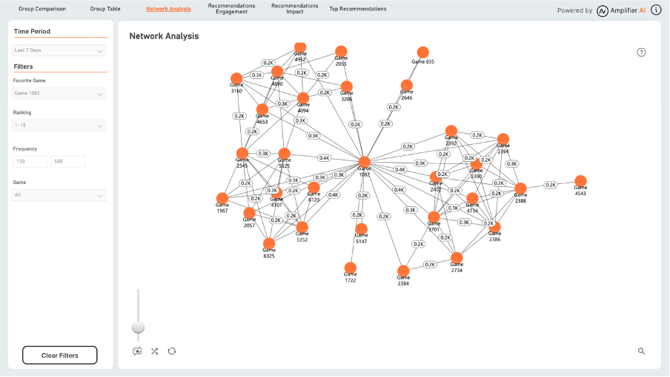
The Network Analysis graph provides insights into the relationship between recommended games in the retail recommendation experience.
This visualisation displays connections between games that are frequently recommended together during active cabinet sessions over the last 7 days. It helps operators identify clusters of games with shared recommendation patterns, game overlap, and potential similarities in session behaviour.
Filter Options
- Time Period: Set for Last 7 days, as a single option.
- Favourite Game: Focus on recommendations related to a specific game, showing how it connects with other games. The favourite game is the centred node in the graph.
- Ranking: Filter the network by recommendation ranking to focus on top-ranked games. There are 2 options: Ranked 1-5 and ranked 1-10.
- Frequency: Set a minimum and maximum frequency threshold to focus on games with certain levels of recommendation frequency and filter out games with weaker relationships.
Key Metrics in the Network Analysis
- Game Name: Each node represents a game in the recommendation network.
- Frequency: The connection lines between games represent recommendation frequency. Higher frequency indicates that the games are more often recommended together across cabinet sessions, while lower frequency indicates less common recommendation patterns.
- Recommendation Clusters: Groups of closely connected games indicate sets of games that are often recommended together. These clusters can suggest shared appeal, similar session behaviour, or common recommendation paths across retail cabinets.
Interpreting the Data
- Core Game: Game at the centre of the network with multiple connections (e.g., Game 1097) is the one you filtered Favourite Game.
- Peripheral Games: Games with fewer connections or that are on the outer edge of the network may have niche appeal or limited overlap with other games.
- Recommendation Overlap: Strong connections between games indicate that players often receive recommendations for these games together. This insight can guide bundling or thematic promotion strategies.
Best Practices for Using This Dashboard
- Identify Core and Niche Games: Focus on core games with high connectivity for widespread promotion, and use peripheral games for targeted recommendations based on specific player interests.
Understanding the "Recommendation Engagement" page
Overview
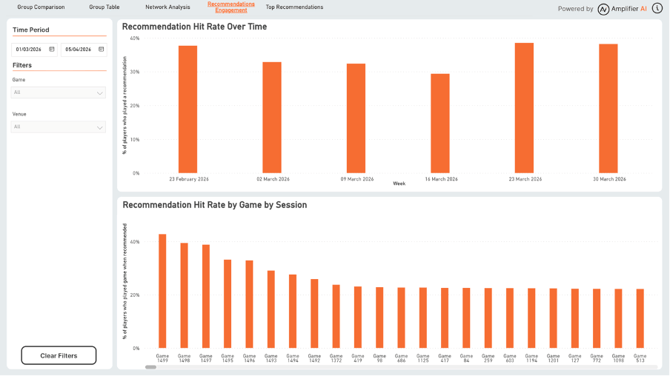
The Recommendations Engagement dashboard focuses on how well retail game recommendations perform, specifically measuring session engagement with recommended games. It includes two primary metrics: Recommendation Hit Rate Over Time and Recommendation Hit Rate by Game by Session.
-
Recommendation Hit Rate: This is the percentage of sessions where a recommended game was played. A higher hit rate indicates stronger alignment between recommendations and session behaviour.
Filter Options
- Time Period: Set a custom date range to view recommendation engagement over a specific period.
- Game: Filter the dashboard to focus on one or more specific games.
- Venue: Filter the dashboard by venue to analyse recommendation engagement across specific retail locations.
Key Sections of the Dashboard
- Recommendation Hit Rate Over Time
- This chart tracks the hit rate percentage for recommended games across weekly intervals. It shows fluctuations in session engagement with recommended games over time.
- Interpreting Trends: Consistent or increasing hit rates over time indicate effective recommendation strategies, while sharp dips may suggest a need to review the relevance, placement, or timing of recommendations.
- Recommendation Hit Rate by Game by Session
- This section displays the hit rate per game at session level, illustrating how effective each game recommendation is in terms of session engagement.
- Interpreting High vs. Low Hit Rates: Games with higher hit rates are better aligned with session behaviour and may be prioritised in recommendation strategies. Games with lower hit rates may need additional testing, repositioning, or venue-level review to boost engagement.
How to Use This Dashboard
- Identify Trends: Observe hit rate changes over time to determine the effectiveness of ongoing recommendation strategies and refine them based on seasonal trends, venue-level differences, or session behaviour changes.
- Optimise Game Recommendations: Games with consistently high hit rates represent strong recommendation candidates. Consider increasing their exposure in recommendations to maximise engagement.
Understanding "Top Recommendations" page
Overview
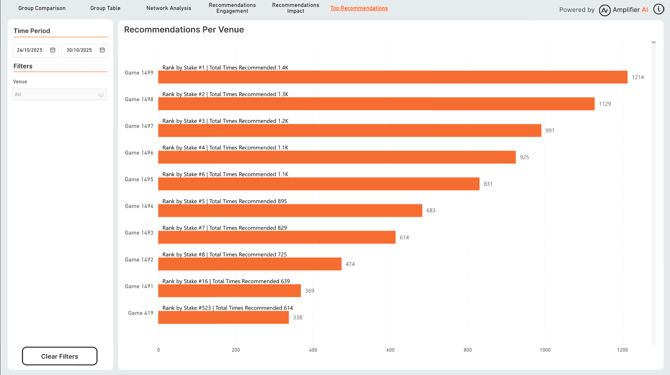
This dashboard provides insights into the top games recommended across venues over a selected time period. It ranks games based on recommendation volume and stake ranking, helping operators identify which games are most often recommended in the retail environment and how those games rank by total stakes.
Filter Options
- Time Period: Set a custom date range to view recommendation data over a specific period.
- Venue: Filter the dashboard by venue to analyse recommendation performance across specific retail locations.
Key Metrics in the Dashboard
- Game Name: The name of each recommended game.
- Number of Recommendations: Shows the number of times each game was recommended across the selected time period.
- Rank by Stake: Indicates the rank of each game based on total amount staked.
- Number of times recommended within the selected rank: Shows the number of times the game was recommended to within the selected time period and the Ranks filtered
Interpreting the Data
- High Recommendation Volume & High Stake Rank: Games that are frequently recommended and also rank highly by stake indicate strong retail titles that are both visible in recommendations and associated with significant customer spend.
- High Recommendation Volume but Lower Stake Rank: Games that are frequently recommended but have a lower stake rank may have strong recommendation visibility but lower monetary engagement. These games may need further review to understand whether they are best suited to specific venues, cabinet contexts, or session types.
- Optimising Recommendations: Use these insights to understand which games are receiving the most recommendation exposure and whether that exposure aligns with stake performance.
Best Practices for Using This Dashboard
- Focus on Top Performers: Identify the highest-performing games and ensure they continue to receive prominent placement in recommendations.
- Test New Games: Monitor recently added games and see how often they appear in recommendations versus established titles.
- Compare Venue Performance: Use the Venue filter to understand whether top recommended games vary across retail locations.